What Is OT, and Why Does It Matter for Cybersecurity?
Production lines, chemical plants, power plants, factories, and many other types of industrial complexes rely on Operational Technology (OT).
OT is a common term in the industrial space, but what exactly does it mean?
In simple terms, OT is the technology that directly runs and controls physical processes in the plant or facility.
- HMIs (Human-Machine Interfaces)
- PLCs (Programmable Logic Controllers)
- Controllers, sensors, and industrial workstations tied to the process equipment
These systems sit on the industrial side of the environment – not in the typical office cubicle space.
A Simple Example OT Layout
Take a look at the diagram below:
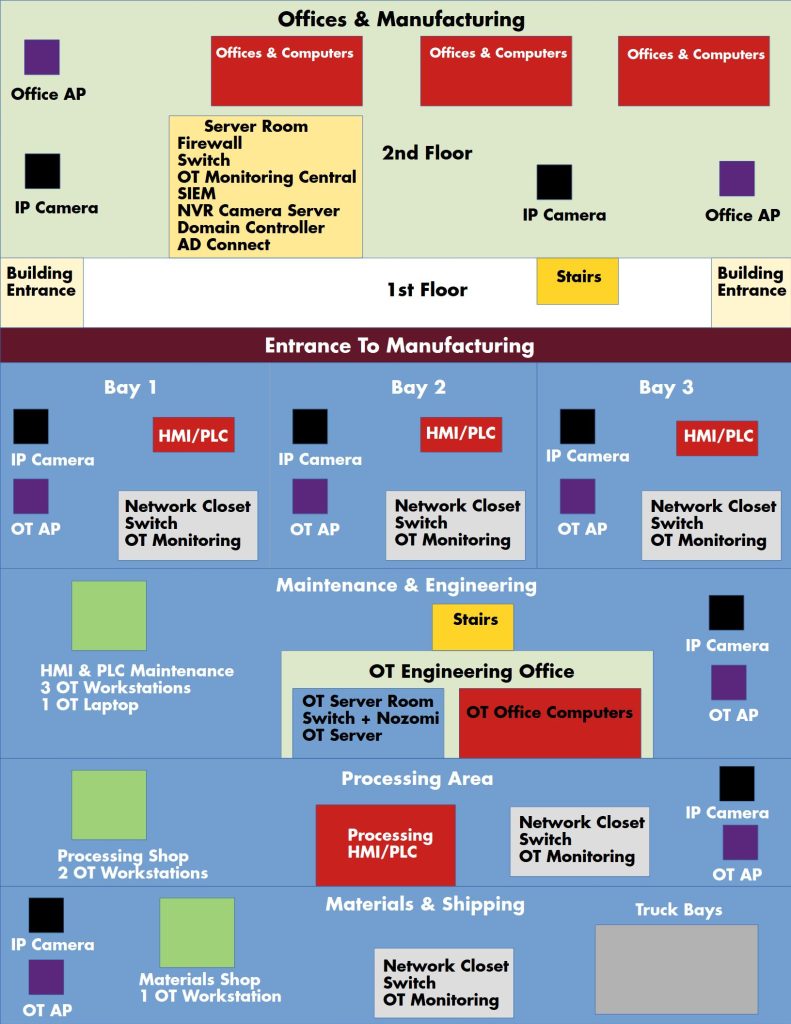
This is an example layout, but many real factory environments will look very similar.
The key thing to notice is the separation between:
- The Office / IT side – regular computers, email, business apps
- The Manufacturing / OT side – HMIs, PLCs, OT workstations, and engineering systems that interact with equipment
Having a clean separation between these areas is critical. On the OT side you’re dealing with equipment that can cause injury, safety issues, or major downtime if something goes wrong.
What Do We Mean by OT Cybersecurity?
When I say OT Cybersecurity, I’m talking about the security of:
- The controls (HMI, PLCs, engineering workstations)
- The network those devices sit on
- The servers that monitor, log, and manage industrial systems
In other words, we’re protecting the systems that touch real-world machinery and people.
If those systems are compromised, an attacker isn’t just stealing data – they could stop production, damage equipment, or create situations that put workers at risk.
Why OT Cybersecurity Is So Important
There are three big reasons I focus on OT security:
1. Protecting People and Safety
The top priority is always human life and safety.
Improperly controlled equipment can:
- Move unexpectedly
- Overheat or over-pressurize
- Fail to shut down during an emergency
A cyber event that impacts OT can quickly turn into a physical safety incident. Good OT security reduces the chance of that happening.
2. Defending Against Cyber and Physical Threats
Next is classic security against threat actors and unauthorized access:
- Ransomware or destructive attacks that shut down production
- Intrusions that manipulate process settings or data
- Unauthorized remote access into OT networks
- Attempts to bring power plants or critical infrastructure offline
These often overlap with safety concerns, but they also affect reputation, compliance, and financial loss.
3. Keeping the Facility Running
Finally, we have functionality and uptime.
Even if an incident doesn’t cause physical harm, it can still:
- Take a key machine offline
- Slow down a production line
- Disrupt shipping, receiving, or materials handling
When critical OT systems are down, the whole factory can grind to a halt. Solid OT Cybersecurity is a big part of keeping that downtime as low as possible.
I like to summarize it as defending against:
Life Threats, Cyber Threats, and Facility Functionality Threats.
A Simple OT Cybersecurity Process
There’s a lot that goes into a mature OT security program, but we can break it into a simple high-level process.
Step 1 – Map the Environment (Most Important Step)
Start by mapping out how your factory or plant actually works:
- Where the machinery, cameras, controls, and OT workstations are located
- How people move through the facility and use the equipment
- Which systems are safety-critical
- What level of detail you want to capture (logs, alarms, status, etc.) and how often
This map is the foundation for every decision that comes next.
Step 2 – Build Out the Connectivity
With the plan in place, you start wiring and connecting:
- Cables from machinery to HMIs and PLCs
- Connections from OT devices to engineering/monitoring servers
- Network paths for reporting, logging, and control
- Internet/Uplink paths where they’re truly needed
At this stage, you’re making sure the industrial equipment and the supporting computers/servers can talk to each other reliably.
Step 3 – Separate OT and IT
Now it’s time to draw a clean line between factory and office:
- Put the office/IT side and OT side on separate VLANs or network segments
- Use firewalls or routing rules between them
- Limit which systems are allowed to talk across that boundary
The goal is to keep OT reachable and manageable only by people with the proper knowledge and authority—while preventing a random office PC from having direct access to a PLC.
Step 4 – Add Security Monitoring and Access Control
Once the core network is in place, you start layering on security:
- Collect data from each network segment (logs, flows, alerts)
- Forward that data to a central OT/IT monitoring system or SIEM
- Monitor for unusual behavior or signs of attack
- Enforce controls around who can log in, make changes, or use remote access
This is how your cybersecurity team knows what’s happening in the factory side in real time.
Step 5 – Test, Measure, and Improve
Finally, you validate the setup and see how it behaves under real conditions:
- Do alerts from the factory side actually reach the right people?
- Are emails and ticketing working?
- Are accounts secure and following least-privilege?
- Can people easily follow the factory’s safety and security guidelines?
- What does downtime look like now that these systems are in place?
You should walk through scenarios from both the office side and the OT side and make sure the response process is clear.
Good numbers and visibility across these areas are what tell you if your OT Cybersecurity program is working.
Wrapping Up
This post just scratches the surface of OT Cybersecurity. A power plant, for example, has very different requirements than a factory that produces a physical product—but the core ideas around safety, separation, monitoring, and uptime are the same.
This is the first of many OT Cyber posts I plan to write. In future posts I’ll go deeper into:
- How to protect a factory from external and internal threats
- Practical examples of segmenting IT and OT
- What to monitor and log on the OT side
If you’d like to talk about your own environment—or you’re not sure how exposed your OT setup is—you can reach me at ryan@cenegi.com or through the contact page on my site.
Thanks again for taking the time to read this, and stay tuned for the next OT Cyber post.